I recently got a BetaFPV Aquila 20 HD kit, which included their VF04 HD goggles. I then purchased 2 P1 Air units to use on a tricopter and quadcopter, both running iNav 9.
In iNav I set the port to "MSP Display Port" and video format to "AVATAR" according to the instructions.However, there was no OSD display showing the goggles. I checked everyting (wires connected correctly etc.). Eventually I found that if I set the port to "Furious FTP VTx", rebooted and then changed it to "MSP Display port", I did get some OSD, though the different items (battery voltage, Craft name etc.) kept blinking off and on. Also the display was showing strange characters instead of the proper ones (e.g. the icon for the battery voltage, horizon line etc.)
I also noticed that the firmware version was 1.0.36 for both the goggles and VTx (the current version at the time of writing is 2.0.6).
Upgrading the firmware and changing some settings solved the problem.
As version 2,x is not compatible with version 1.x and you have to upgrade to 1.0.44 before going to 2.0.6, I had to perform the following steps:
- Upgrade the firmware on the goggles to 1.0.44
- Rebind each VTx and flash it to 1.0.44 (note, the bind button for the VTx on the Aquila 20 HD drone is accessed through the slot at the front starboard propeller (see photo))
- Rebind each VTx and flash it to 2.0.6
- Flash the goggles to 2.0.6
- Rebind each VTx
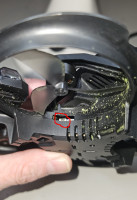
Aquila 20 HD VTx bind button
To resolve the strange characters problem, I tried each of the video modes and found that "BFHDCOMPAT" gave the best result.
Note: the port should still be set to MSP Display port.